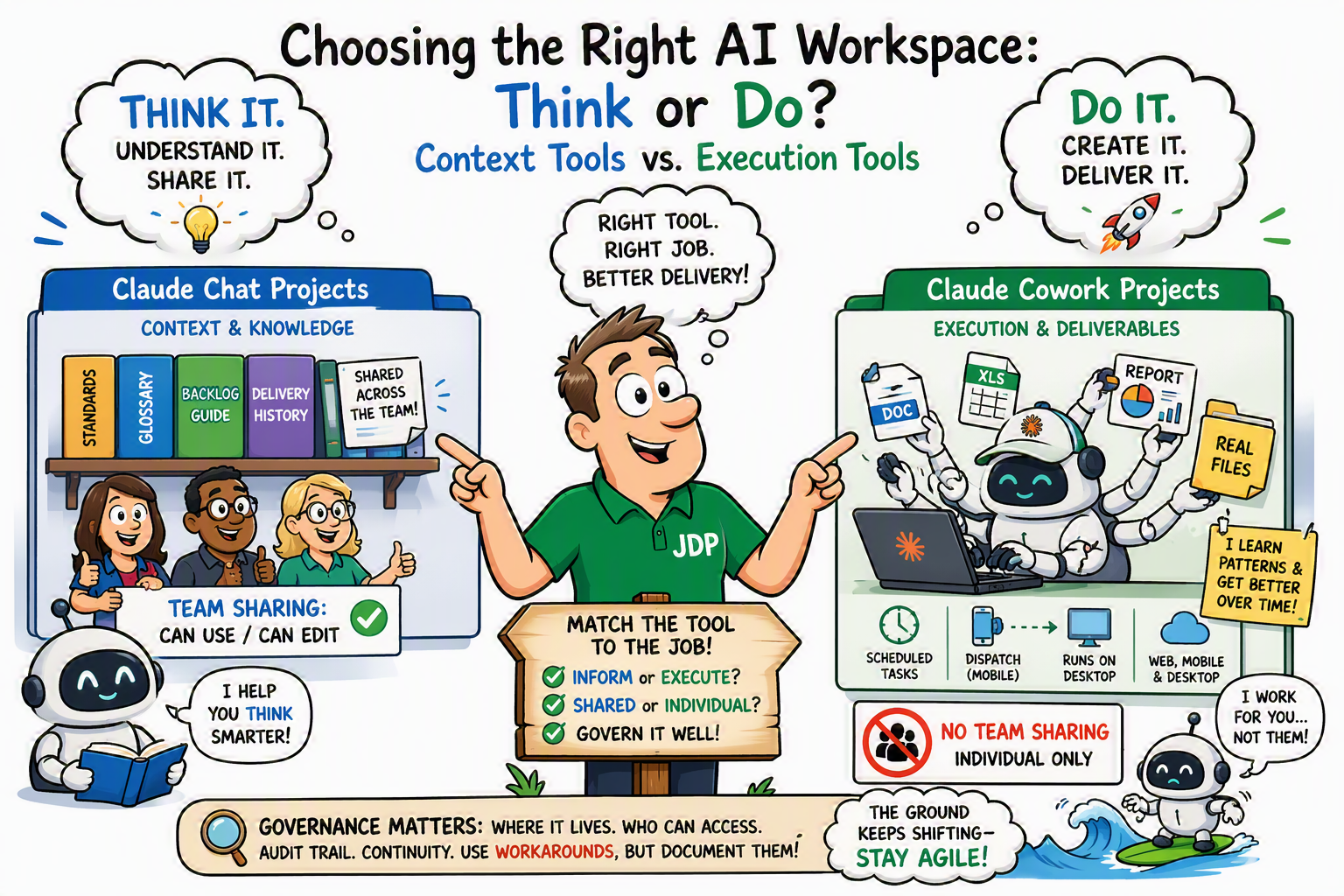
Anthropic's Claude product suite has two persistent-workspace features that both happen to be called "Projects." Claude Chat Projects lives inside claude.ai. Cowork Projects lives inside Claude Cowork, the agentic desktop tool. The naming collision causes real confusion, because the two features are not different tiers of the same thing. They are built for different kinds of work, and picking the wrong one for the job wastes time without you ever realizing that's what happened.
That distinction matters to me for the same reason methodology selection matters in Triple A Program Delivery. Scrum and Waterfall are both legitimate delivery approaches, but choosing between them isn't a preference call, it's a fit call based on what the work actually requires. Chat Projects and Cowork Projects work the same way. Neither is the "upgraded" version of the other. Each is correct for a specific kind of work, and this article is about telling the two apart before you commit a workflow to one of them.
The Core Distinction: Context vs. Execution
The fastest way to tell these apart is to ask what each one is actually doing for you.
Claude Chat Projects are about giving Claude the right context for a conversation. You upload documents and standing instructions, and Claude draws on that material to have smarter, more consistent conversations with you across sessions. The output is the conversation itself, along with whatever you generate from it.
Cowork Projects are about giving Claude the right setup to actually do work. You point Claude at a real local folder, and it reads, writes, and creates files there directly, combined with automation like scheduled tasks and Dispatch. The output is finished deliverables sitting in your file system.
Context vs. execution is the entire distinction. Everything else in the comparison below follows from it.
Side-by-Side Comparison
| Dimension | Claude Chat Projects | Cowork Projects |
|---|---|---|
| Where it lives | Inside claude.ai (web and desktop app) | Inside Claude Cowork (desktop, with web/mobile rolling out) |
| Core purpose | Persistent context for conversations | Persistent context and an execution environment for real work |
| What's stored | Uploaded documents, project instructions, chat history | Local folders (read/write), standing instructions, links, a dedicated memory store |
| File access | Uploaded files become a knowledge base Claude references in chat | Directly reads and writes real files and folders on your computer |
| Output | Chat responses; can generate some files, but you're guiding conversationally | Finished deliverables (documents, spreadsheets, presentations, reports) with less step-by-step guidance |
| Memory across sessions | Knowledge base persists; conversations are separate | Persistent memory scoped to the project; Claude learns your patterns over time |
| Automation | None | Scheduled tasks and Dispatch (assign from mobile, executed on desktop) |
| Storage location | Cloud, tied to your Claude account | Local machine only (currently), not synced to the cloud |
| Team sharing | Supported on Team/Enterprise plans; individual, bulk, or org-wide, with "can use" or "can edit" permissions | Not natively supported; local to one machine and one user |
| Best suited for | Recurring conversational work needing consistent context: a newsletter editorial system, a research initiative, a client engagement | Recurring hands-on work needing execution: a folder of client proposals, recurring report generation, automated recurring tasks |
Advantages of Claude Chat Projects
Chat Projects earn their place when the deliverable is the conversation, or something that comes directly out of it. Their strengths:
- Team sharing that's actually built in. On Team and Enterprise plans, a Chat Project can be shared individually, in bulk, or org-wide, with granular "can use" or "can edit" permissions. Cowork Projects have no native equivalent yet.
- Cloud persistence. The knowledge base lives with your account, not on one machine, so it's available wherever you sign in.
- Built for iterative, conversational work. When the value is in the back-and-forth, refining an argument, working through a research question, drafting and redrafting, a Chat Project keeps every session grounded in the same context without you re-explaining it.
- Scales with large source material. On paid plans, Chat Projects automatically apply Retrieval-Augmented Generation as your knowledge base grows, expanding usable capacity roughly tenfold instead of hitting a hard context wall.
Advantages of Cowork Projects
Cowork Projects earn their place when the deliverable is a file, or a set of files, that needs to exist on disk. Their strengths:
- Direct execution, not description. Claude reads and writes the real files in your folder. You're not copy-pasting output out of a chat window into a document afterward.
- Standing automation. Scheduled tasks run recurring work without you initiating it, and Dispatch lets you assign work from mobile that executes back on the desktop.
- Project-scoped memory that compounds. Claude picks up your patterns and preferences within that specific project over time, the same way a team member who's worked a folder for months needs less hand-holding than one on day one.
- Less conversational overhead for repeatable output. For work that's genuinely repeatable, generating the same kind of report or document on a cadence, Cowork produces the finished artifact with fewer conversational turns than steering the equivalent output through chat.
Practitioner Takeaway
This is a smaller-scale version of the same judgment call Triple A Program Delivery asks you to make at the methodology layer: understand what kind of work you're actually doing before you pick the tool that delivers it. AI accelerates execution once you've made that call. It doesn't make the call for you, and it doesn't change the underlying criteria.
There's a governance dimension here too, and it's worth naming rather than glossing over. Cowork Projects currently have no admin controls, no native sharing, and store everything locally rather than in the cloud. For a solo practitioner iterating on deliverables, that's a non-issue. For an enterprise team that needs an audit trail, access control, or a durable shared knowledge base, those gaps matter and should factor into the decision the same way any other governance guardrail would. Choosing Cowork for execution speed without accounting for what it doesn't yet govern is the kind of shortcut Triple A treats as a guardrail, not an obstacle to route around.
As a practical workaround, some teams point a Cowork Project at a folder synced through OneDrive or SharePoint, letting cloud sync stand in for native sharing. It works, with one caveat: set the folder to force a full local download rather than on-demand streaming, or Cowork may see file placeholders instead of real content. That's a workaround, not a substitute for governance, and it should be treated as one.
This reflects Anthropic's publicly available documentation as of July 2026. Cowork is in active beta, and specifics around sharing and platform availability may change. Check support.claude.com for the current state of these features.